SaralHisab: A Clearer Way to See Your Diary’s Money Flow: The New Balance Report
Keeping track of money coming in and going out of your diary just got a lot easier. We’ve redesigned the Balance Report to show your income andexpense entries together, in one simple table — sorted by date, just like a bank statement.
What’s Changed?
Previously, the balance report showed two separate lists: one for all your expenses, and another for all your income. If you wanted to see how your money moved day-to-day, you had to jump back and forth between the two sections.
Now, every entry — income or expense — appears in a single chronological table, with the most recent transactions at the top. Each row clearly shows:
- 📅 The date and time of the entry
- 📝 Who it was from/to, along with a short description
- 🔴 The amount, in the Expense column
- 🟢 The amount, in the Income column
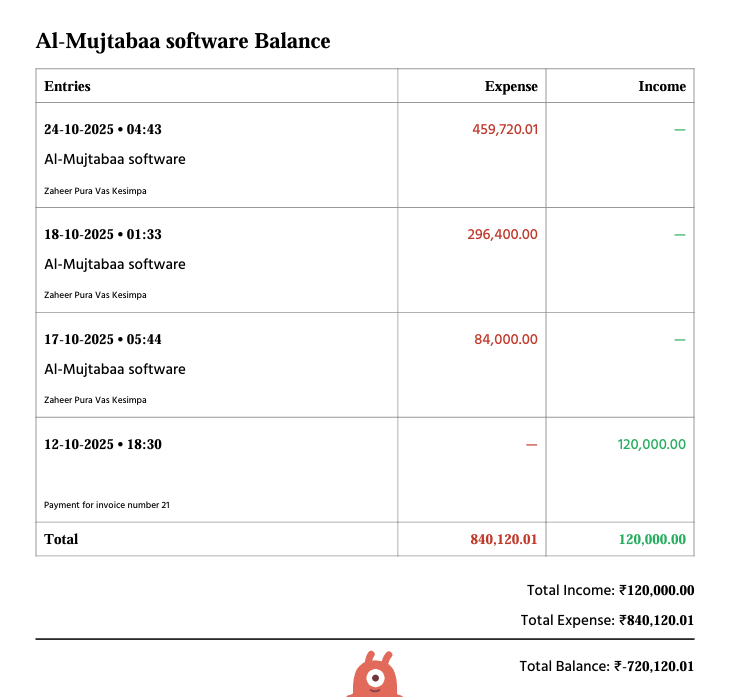
Why This Is Better? - See your story at a glance — instead of piecing together two lists, you get one clear timeline of every transaction in your diary.
- Spot patterns faster — quickly notice a big expense followed by an income entry, or track your daily cash flow without cross-referencing.
- Cleaner summary — your Total Income, Total Expense, and Total Balance are now shown just once, neatly aligned to the right below the table, instead of being repeated at both the top and bottom of the report. ![Add screenshot of the right-aligned summary section here] Where to Find It Just like before, you can download this report from your diary page — the new layout is applied automatically the next time you generate a Balance Report PDF.
Have feedback on this feature? We’d love to hear from you!
